top of page

Pravah
A flood survey fleet that three people can run without getting in each other’s way.
Scope: 3 roles, 1 operation
Focus: Alert logic & Handover
Duration: 1 Week
Tools: Figma, AI-assistants
01 — THE HOOK
Three roles. Six aircraft. One rising river.
One decides. One flies. One confirms.
A flood has cut off parts of the city, and a fleet of six aircraft is surveying it, relaying signal and carrying small relief packets. Three people run it. A supervisor decides. A pilot flies when a human has to. A field liaison confirms on the ground what actually arrived. Pravah is the interface for all three.
Why I built this
I design operator interfaces for mission-critical systems for a living. Most of that work can’t be shown, so I built one I can, from public sources only. The questions are the ones the job teaches: what an operator needs in the first five seconds, what is allowed to interrupt them, and what the screen should do when its own data is wrong. The river is real. The levels, requests and aircraft are not.
DECIDES: Supervisor

FLIES: Pilot

CONFIRMS: Field Liaison
Three screens, one operation. Each shows only what its person needs to act.
02 — THE BUILD
The rules came before the screens.
Six aircraft, a river that keeps rising and three people who all need the same information, but not the same screen. Before drawing anything I wrote down who owns what, because most mistakes in a system like this are not bad screens. They are two people acting on the same thing.
The Problem
A flood fleet produces more than one person can watch: aircraft status, relief requests, gauge readings, wind, lost links. If everything is shown the same way, the supervisor drowns. If every role sees everything, they start stepping on each other. The design question was never “what do we show”. It was “who acts on this, and how soon”.
Rules I set
Six rules, written before any screen.
01
One aircraft, one person at a time. When the pilot takes control, the supervisor can watch but not steer, and can ask for it back.
03
Each role owns one call. The supervisor decides what the fleet does. The pilot flies one aircraft. The liaison says whether a spot is safe.
05
Colour never works alone. Every state also has a word or an icon.
02
A request closes only when someone on the ground confirms it arrived.
04
Every number shows its age. A reading that is nine minutes old says so.
06
Built for where it’s used. Night palette in the dim control room, plus a day mode for the liaison, who works outdoors.
Three roles, one operation
The supervisor sees the whole picture and a list of decisions, sorted by time left. The pilot sees one aircraft, its map and its camera. The liaison sees one place: what is coming, when it lands, and whether the spot is clear. Each screen leaves out most of what the others show.
Role | SEES | DECIDES | CANNOT DO |
|---|---|---|---|
Supervisor | The whole fleet, the map, every open decision, and the river, rain and wind. | What the fleet does: confirm a drop, hold, recall, hand off, or give an aircraft to the pilot. | Steer an aircraft the pilot is flying. Mark a request as received. |
Pilot Operator | One aircraft: its map, camera, altitude, battery, return margin and the task it was given. | How that aircraft flies: hold, return to base, resume the plan, hand it back. | See the status of the rest of the fleet. Choose which request comes next. |
Field Liaison | One place: what is coming, when it lands, what is on board, and their own requests. | Whether the drop spot is clear. What goes into a request. What actually arrived. | Steer or recall an aircraft. See the fleet. |
Supervisor hierarchy
The supervisor’s screen reads top to bottom in the order the supervisor needs it: what is wrong, what is waiting, where it is, who is flying, and what is changing.

Read order, not layout order.
01
Alert strip:
What is wrong, right now.
04
Fleet row:
Who is flying what.
02
Decisions:
What is waiting, by time left.
05
River, rain, wind:
What is changing.
03
Map:
Where it is happening.
03 — THE THESIS
Interrupt. Notify. Wait.
Not everything gets to interrupt.
In a flood operation almost everything is urgent, which makes urgency useless as a sorting rule. The decision that shaped every screen was to separate “important” from “allowed to interrupt a person”. Pravah has three levels, and each one behaves differently, not just louder.
Alert logic
Interrupt is red and means act now. It takes over the top of the screen and stays until someone acknowledges it. If nobody does, it comes back at 30 seconds and pages a second operator. A lost aircraft link is an interrupt.
Notify is amber and means decide within a window. It sits in the decisions list with a countdown, in order of time left. A gust forecast above an aircraft’s limit is a notify.
Wait is grey. It is logged, visible if you look, and never asks for attention.
Teal is reserved for nominal. Colour never carries a level alone: each one also has its own words, icon and position.

Three levels. The difference is what each one is allowed to do to a person.
When the data ages
A screen is only as honest as its oldest number. So every reading carries its age, “9 min old” on the river gauge and “data 2 min old” on a survey aircraft, and what it does about stale data matters as much as showing it.
The button that depends on stale or blocked data does not disappear. It dims, and the screen says why: “Send S1 to check” is greyed because “S1 is under pilot control”. A lost aircraft keeps its last known position as a dashed ring, not a silent gap. A report from outside, like the helpline call about cattle, is labelled not verified until an aircraft confirms it.
A disabled button that explains itself is worth more than an enabled one that is wrong.

One reading ages from 2 seconds to no link. The decision card, fleet card and map icon each say so in the same colour.
04 — THE SYSTEM IN USE
One request, three roles.
The request closes on the ground.
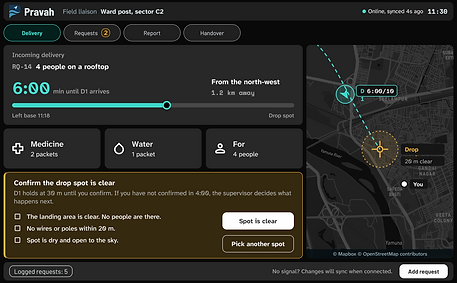
RQ-14 is four people on a rooftop. The liaison logs it, the supervisor sends S1 to verify, and a pilot takes manual control. Once S1 has seen the people, the supervisor confirms the drop. D1 holds at 30 metres until the liaison says the spot is clear. The request closes only after the liaison confirms what arrived.

Seven steps, three people. Nothing closes until the ground says so.
Pilot
When an aircraft needs a person’s hands, one pilot takes it. S1 shows who has it on the supervisor’s fleet card and on the pilot’s own header, so nobody wonders who is flying. The supervisor can still watch it but can’t steer it, and has one control: Ask hand back. The pilot’s screen is built around a single aircraft: its position, link and battery, and the one task in front of them.

One aircraft, one person. The rest of the fleet stays out of the way.
Field liaison
The liaison is the only role standing where the packet lands. Their screen has two answers for a held drop: “Spot is clear” or “Pick another spot”. If nobody answers within 4:00, the decision goes back to the supervisor, so a missed phone call doesn’t leave an aircraft hovering.
This screen also has a day mode. The supervisor and pilot work in a dim control room, so those screens are dark. The liaison is outdoors, in glare, often holding the device in one hand. Night colours wash out there, so the liaison gets a light palette with the same shapes, words and positions.


Same screen, two palettes. Chosen for where it’s used.
05 — WHAT THIS PROVES
What it shows, and what it doesn’t.
The screen never hides what it doesn’t know.
Pravah is one week on a problem I wanted to get right: how three people watch the same flood without watching the same screen. What it shows is a way of working. Rules first, screens second. Alerts sorted by what they are allowed to do to a person. Every number carrying its age. Every request closing only when the person on the ground says so.
A good operator screen is honest about its oldest number.
What I’d test
Planned, not run. Each test says what would count as a pass.
01
The next decision.
Show the supervisor screen to someone who has never seen it and ask what to do first.
Pass: they pick the right card from the decisions list without help.
02
Old numbers.
Show the river gauge live, at 2 minutes and at 9 minutes.
Pass: people stop acting on the 9-minute number and can say why the button is greyed.
03
Outside, in glare.
Put the liaison screen on a tablet at noon, one hand, and ask for “Spot is clear” or “Pick another spot”.
Pass: no wrong taps, and day mode reads without shading the screen.
04
The handback.
Time how long a pilot takes to hand an aircraft back and how long the supervisor takes to notice.
Pass: there is never a moment when nobody is flying.
What I’d change
01
The failed drop.
The liaison screen handles “2 of 3 received”. The supervisor’s side of that is not designed: what is missing, send another or close.
02
Sound.
The red strip needs eyes. A control room needs an audible interrupt, and a way to silence it that doesn’t hide it.
03
Language.
The liaison works on the ground in Delhi. The screen should work in Hindi first, not in English with a translation.
04
A longer list.
The decisions list shows four cards. I have not designed it for fifteen.
Scope, stated plainly
Pravah is a one-week speculative project. The fleet, requests and readings are fictional. The river and its gauge levels are real public figures. It covers three roles and one operation. It has not been tested with operators. There is no prototype, no motion, no sound, no Hindi, and no formal accessibility audit. It is built from public sources only, and nothing from any employer is in it. I did the rules, alert logic and screens in Figma, with AI assistants for drafting and image work.
The question underneath is small and it travels: what does a screen owe the person looking at it when it can’t be sure?
Sources and credits
-
Map data: © Mapbox, © OpenStreetMap contributors.
-
Typeface: Atkinson Hyperlegible Next and Mono, Braille Institute, SIL Open Font License.
-
River levels (warning 204.50 m, danger 205.33 m, evacuation 206.00 m): Central Water Commission, Old Railway Bridge gauge, Yamuna.
-
Everything else was drawn by me.
MORE WORK
Keep exploring.
End-to-end case studies documenting research, strategy, and design decisions.


bottom of page